by Software Arts, Inc. |
|
|
pc/MRP is a powerful, inexpensive major MRP system used by over 2,400 companies in 58 countries!
Infinite Bucket MRP
Schedule the company's manufacturing operations
pc/MRP's Infinite Bucket MRP Module allows users to generate MRP action items (purchase order, buy, issue, make, sale) and generate MRP reports and a graphical time line of action items.
Advanced features include:
QuickBooks Interface Module
Keep using QuickBooks for A/P and A/R - No double entries!
pc/MRP is the base program, used to control inventory, generate purchase orders, receivers, work orders, stockroom transactions, sales orders and invoices.
QuickBooks is used as the accounting module to make deposits, pay bills, print financial statements, generate credit and debit memos.
Manage Your Inventory - Parts and Assemblies
Half million parts - Twenty inventory warehouses and WIP
Track avg/std/last purchase order costs, vendor/customer price quantity breaks, on hand qtys, WIP qtys. Download price quantity breaks from the WEB.
Perform inspections, physical inventories and cycle counts. Manage serial/lot numbers and alternate currencies. Create where used reports and check your inventory value for any date. Manage all documents, drawings and PDFs. Synchronize with your WEB store.
Manage Your BOMs
Bills of Materials - 100 levels deep
In the Bill of Materials Module create exploded and single level BOMs and PIC lists (costed or uncosted). Drill down/up thru BOMs, perform cost roll-ups. Import Bill of Materials from .CSV files.
Manage alternate part#s, inside/outside labor and unlimited reference designators. Supports blow through BOMs, phantom BOMs, preliminary BOMs and released BOMs.
Customers and Vendors
Unlimited Contacts and unlimited Contact Methods
All your CRM information at your fingertips. Billing/shipping/remittance. Large 6 line addresses. Display map. Check customer balance, average days to pay and credit limit. User-defined list boxes. Process credit cards with a click of a button.
Manage all related documents, DOCs and PDFs. Create pop-up messages, ticklers and address labels. Unlimited comments. Salesman info, tax info and much more.
Purchasing
pc/MRP highlights the best vendor for the PO quantity
Each line item can contain a unique tax rate, discount, due date and unlimited comments. Include a custom boiler plate and/or terms & conditions.
Part and vendor details will be entered automatically.
Receiving
Receive partial PO quantities
Keep track of received qty and outstanding qty
Part and vendor details will be entered automatically from the PO and can be written over if no longer correct.
Each line item can contain a unique tax rate, discount, due date and unlimited comments.
Sales Orders
Automatically create an invoice for "cash and carry" and "account and carry" sales orders
Users can enter in house work orders to build to stock. The work order contains valuable information such as has it been issued to manufacturing and how many assemblies have been completed and returned to the stock room. It is important to note that order entry sales orders automatically become work orders.
Invoicing
Invoice partial SO quantities
Keep track of invoiced qty and backorder qty
Part and customer details will be entered automatically from the sales order and can be written over if no longer correct. Each line item can contain a unique tax rate, discount, due date and unlimited comments.
Email or fax your invoices directly from pc/MRP. Print standard or custom reports, shippers and shipping labels. Print shipment reports and a bill of lading from the Shipment Module.
|
Use pc/MRP's Accounting Module for receiving payment. Create credit memos. Another option is to seamlessly integrate pc/MRP with QuickBooks, and use QB for managing your A/R. |
Stockroom
pc/MRP keeps track of shortages and partial quantities
Handles breakage and parts not on the BOM
Reports include check availability and max potential build.
Accounting
Double Entry system with multilevel Chart of Accounts
pc/MRP's Accounting Module will provide state sales tax reports, sales commission reports, cost of sales reports and many more.
Create drill down reports and income and expense graphs. Post a month and reclose any prior month. Process credit cards with the click of a button.
Serial/Lot Number Module
Keeping track of serialized parts and assemblies
The Serial/Lot Number module will allow users to enter, generate or pick serial numbers when receiving, issuing, or invoicing a serialized part or finished assy.
When receiving parts or receiving back from manufacturing: If you are recording lot numbers, enter your lot number, the quantity in the lot, the vendor's lot number, and the expiration date (if any). If you are recording serial numbers, enter your serial number, the quantity as 1, vendor's serial number, and expiration date (if any).
Barcoding with pc/MRP
Inventory Control - Efficiently and Accurately
pc/MRP offers a Barcode Builder that accommodates numerous barcode styles and options, and guides the user through the successful implementation in their custom reports.
Users can insert barcodes into labels and various forms and reports.
Automatic Credit Card Processing
Charge a credit card in a safe and fast way.
Unlimited number of credit cards per customer. Mark expired cards as inactive.
The credit card number will be encrypted whenever the record is saved.
Lower your rates by entering as much information as possible.
pc/MRP can validate a credit card number and (optionally) reformat the credit card# by inserting hyphens at the appropriate places.
pc/MRP Is Easy to Implement
How to import your data into pc/MRP
When switching to pc/MRP, users can easily import their existing data from another system. pc/MRP is able to import addresses, parts, BOMs, vendor price qty breaks, sales orders, etc. from ASCII, CSV, dBASEIII, XML or XLS files.
View the video for an example of importing Bill of Materials data. For detailed information on importing into other database tables, see our tutorials in MRP101.
Quality Control
Inspection Module
pc/MRP's Inspection Module allows quality control inspectors to record and save their inspection records for parts and assemblies that require an inspection.
Users can specify the events when an inspection must be performed (part received, manufactured, invoiced and/or shipped) and specify what criteria will be used to inspect it. Link the certificate of compliance (.PDF) to the record.
Routing
25 user definable work areas
Track the location of sales/work orders on the manufacturing floor.
Enter WS Value Percentages. Print reports.
Issuing parts to manufacturing for a sales/work order automatically creates a routing record. Users can designate a work area as "finished goods". Moving products into this area can be used instead of a stockroom transaction receiving back from the manufacturing floor.
Create Your Online Store
Import orders into pc/MRP
Connect pc/MRP with your Shopsite web store.
Download the orders your customers have submitted online. pc/MRP's web store interface will import the orders into your sales orders database table.
Additional Modules and Functions in pc/MRP
Please see MRP101 for detailed tutorials Part I.
Advanced Password Module: Define an infinite number of user name and password combinations. Each name and password combination can be assigned individual rights (none/view/create/edit/delete) to each pc/MRP module.
Audit Trail: Trace edit changes made in any of the pc/MRP modules (except accounting). The audit trail module will record the date, database, time, user, and field name, the record & item numbers, part/BOM number, or address ID number.
Sales Analysis: Create reports like book to bill reports, consolidated BOM reports, cost of sales report, estimated usage and min qty reports, sales trend reports.
Sales Quote: Assign a % probability to each line item of a sales quote. Easily convert sales quotes to sales orders. Through the use of the infinite bucket module sales quotes can be added for planning and parts from these sales orders will be required according the % probability. Print your sales quote to PDF, or email/fax it directly from pc/MRP.
Purchase Request: Create purchase requests. Send a request for quote to request pricing information from a vendor. Easily convert your RFQ into a purchase order.
Alternate Currency: Create sales orders, purchase orders, etc. in different currencies. Update the exchange rate directly from the Internet.
Additional Modules and Functions in pc/MRP
Please see MRP101 for detailed tutorials Part II.
Engineering Change Notice: Manage ECNs and ECN reports. Print reports that notify purchasing of all open purchase orders that contain part numbers that are affected by ECNs issued in the last 30 days.
Employee Time Tracking: Actually consists of two modules. Employee Info is used by accounting to manage employee records. Time Sheet is used by individuals and/or accounting to manage employee time sheets.
Task Manager & Tickler: Quickly set reminders. Manage and assign tasks of a project. Multiple task reports with various sort and group options.
EDI Import-Export: Allows electronic data exchange between you, your customers, and vendors.
Customer Bulk E-Mailer: Send individual emails to a selected group of your customers or vendors with a few clicks. Keep track of the mail you sent.
Corporate Enterprise Reporting: Have your parts list and BOMs automatically synchronized across the world in real time. Select the desired division from the drop down menu. Print out consolidated financial reports for all divisions, business units, and the entire corporation. Currencies are automatically reconciled.
Scroll for details |
| Single User version | $730.00 |
| Multi User(5) version | $1870.00 |
| Multi User(10) version | $2495.00 |
|
|
|
|
|
|
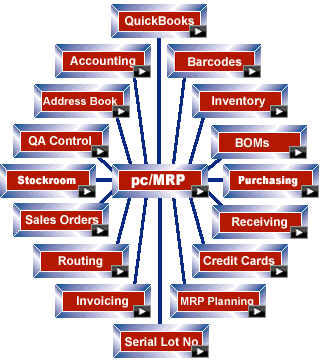
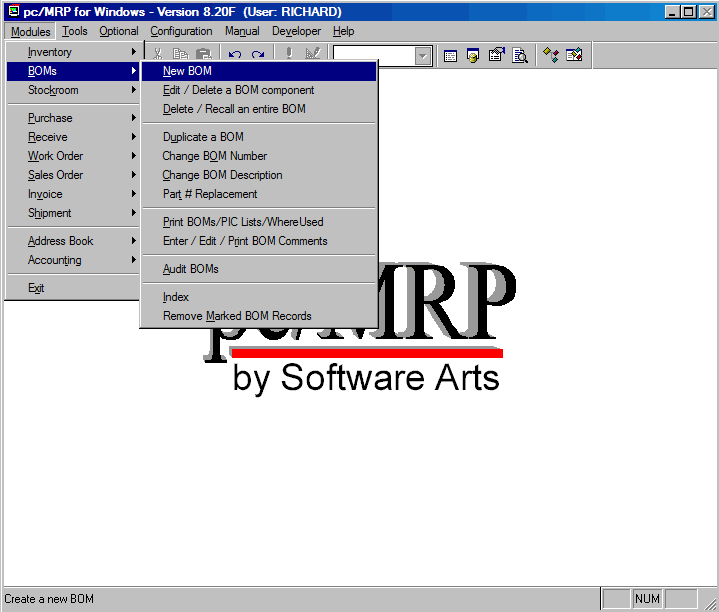
What is pc/MRP?pc/MRP is a fully integrated Material Requirements Planning (MRP), Accounting, and Inventory program. pc/MRP comes complete with ten integrated modules: Address Book, Inventory, Purchasing, Receiving, Sales, Invoicing, Bills of Materials, Stock Room, Shipment, and Accounting (GL, AP, AR). All of the modules can be accessed through the pc/MRP Main Menu shown to the left. Modules can be used on a stand alone or integrated basis. pc/MRP can be configured to support manufacturing, distribution or retail operations. pc/MRP's multi-user version allows multiple people to enter purchase orders, invoices etc. at the same time on PCs networked with any of the multi-user network servers such as Windows, and Novell. |
pc/MRP Main Menu |
|
pc/MRP for Windows was compiled in Visual FoxPro for Windows. Since FoxPro uses dBASE III+ dbf files, pc/MRP's data base files, are compatible with dBase, FOX , Access, Excel etc. Version 8.10 and above uses the Miscrosoft Visual FoxPro database and Microsoft only supports this database through an ODBC interface. pc/MRP's Single-user Business and two Multi-user versions are priced at $730.00, $1870.00, and $2495.00 respectively. Users can upgrade from the single-user version to the multi-user version by contacting Software Arts. Inc. and paying the current price difference between the Multi-user version and the price paid for the non-multi-user version (no data will be lost). Software Arts, Inc. is located in San Jose, California 1-408-226-7321. Hours of operation are 8AM to 12PM & 1PM to 5PM (PST) in California, USA. * QuickBooks is a registered trademark and service mark of Intuit Inc. in the United States and other countries. *** pc/MRP is designed for use only with the U.S. versions of QuickBooks 2003 and higher, (Pro and above). |